


India’s national cybersecurity agency, the Indian Computer Emergency Response Team (CERT-In), has published a Critical Security Advisory (CIVN-2026-0544) warning desktop users of multiple high-severity vulnerabilities in Google Chrome. According to official disclosures from CERT-In and Google, at least one of these flaws is actively being exploited in the wild by threat actors to compromise target systems and execute unauthorized code.
Key Highlights of CERT-In Advisory CIVN-2026-0544
- Critical National Advisory: CERT-In classifies CIVN-2026-0544 with a “Critical” severity rating, urging all desktop users across enterprise, government, and consumer networks to patch immediately.
- Actively Exploited Zero-Day: Google confirmed active in-the-wild exploitation of CVE-2026-125350, a high-severity use-after-free flaw located inside Chrome’s core XML processing component.
- Remote Code Execution Threat: A remote attacker can exploit this flaw by tricking a victim into visiting a specially crafted web page, allowing arbitrary code execution within the browser’s sandbox environment.
- Nine Total Flaws Addressed: The emergency security release resolves nine vulnerabilities across Chrome’s V8 JavaScript engine, GPU pipeline, FileSystem handlers, and compositing layers.
- Immediate Update Required: Desktop versions of Google Chrome prior to version 157.0.8103.50 on Windows, macOS, and Linux are vulnerable and must be updated and relaunched.
CERT-In CIVN-2026-0544: Google Chrome Vulnerability Matrix
| Advisory Dimension | Technical Specification / Verified Details |
|---|---|
| Government Advisory ID | CERT-In Advisory CIVN-2026-0544 |
| Advisory Issue Date | November 10, 2026 |
| Severity Classification | Critical (Highest Threat Tier) |
| Active Zero-Day Identifier | CVE-2026-125350 (Use-After-Free in XML Component) |
| Exploitation Status | Confirmed Active Exploitation in the Wild by Google Security Team |
| Attack Vector | Remote exploitation via specially engineered malicious web pages |
| Impact Assessment | Arbitrary code execution, sandbox escape attempts, and Denial of Service (DoS) |
| Vulnerable Chrome Stable Builds | Google Chrome versions prior to 157.0.8103.50 (Windows, macOS, Linux) |
| Vulnerable Extended Stable Builds | Google Chrome versions prior to 156.0.8078.96 |
| Patched Safe Releases | Version 157.0.8103.50/.51 (Windows/macOS) and 157.0.8103.50 (Linux) |
Understanding CVE-2026-125350: How the XML Zero-Day Works
The primary catalyst for CERT-In’s emergency advisory is CVE-2026-125350, a critical use-after-free vulnerability residing in Google Chrome’s XML parsing library. In memory-managed web browser engines, use-after-free bugs occur when an application fails to clear or reallocate a pointer after memory has been freed. If a user navigates to an adversary-controlled website hosting malicious HTML or XML payloads, the attacker can manipulate memory heap allocation to execute unauthorized instructions.
While Chrome employs a robust multi-process sandbox architecture designed to isolate individual browser tabs from host operating system files, unpatched memory corruption bugs provide attackers with the foundational foothold necessary to initiate remote code execution. Similar sandbox exploitation risks were recently uncovered in mobile operating system runtimes, as highlighted in our technical analysis of the iPhone worse_query sandbox vulnerability.
In addition to the XML zero-day, Google’s emergency update resolves several companion vulnerabilities across the Chromium codebase, including type confusion bugs in the V8 JavaScript engine, out-of-bounds GPU writes, FileSystem authorization lapses, and compositing buffer overflows.
How to Update Google Chrome on Windows, macOS, and Linux
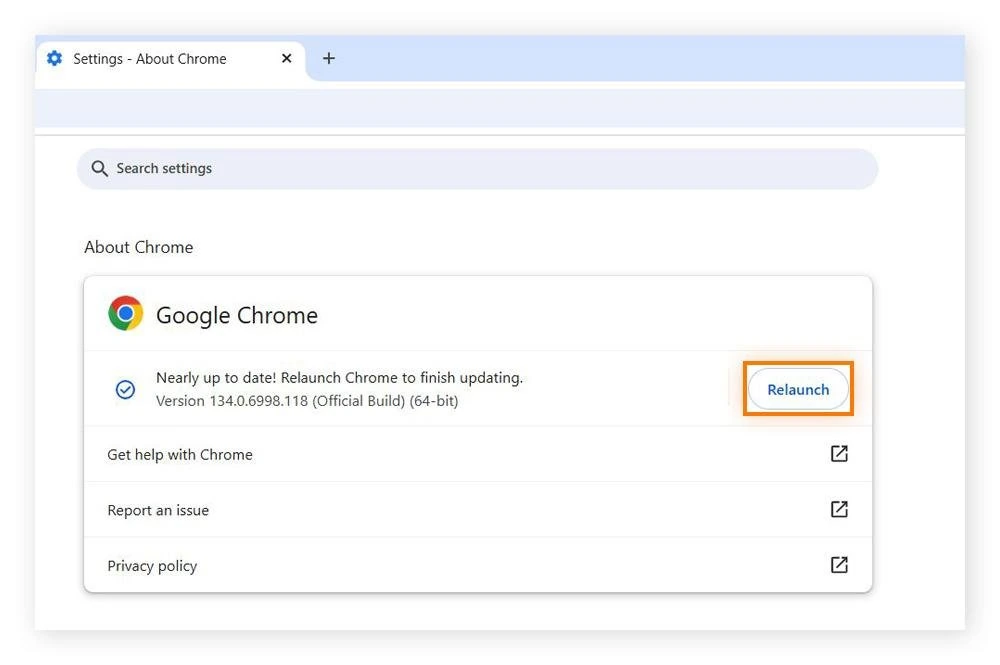
Google has rolled out the patched binaries across its Stable and Extended Stable release channels. While Chrome automatically downloads updates in the background, the security fix is not applied until the browser is fully closed and restarted. Users must manually verify their installation using the following steps:
- Open Chrome Settings: Launch Google Chrome on your desktop and click the three-dot vertical menu icon located in the upper-right corner of the window.
- Navigate to Help: Hover over the Help menu option at the bottom of the dropdown list, then select About Google Chrome. Alternatively, enter
chrome://settings/helpdirectly into the address bar. - Initiate Update Check: Chrome will instantly connect to Google update servers and begin downloading the latest safe build.
- Click Relaunch: Once the download finishes, an orange or blue Relaunch button will appear beside the version number. Click Relaunch to restart the browser and finalize the patch.
- Verify Version Number: After restarting, confirm that your build displays version 157.0.8103.50 or higher on Linux, or version 157.0.8103.50/.51 on Windows and macOS.
PFD Context: Browser Zero-Days in Modern Threat Landscapes
CERT-In’s urgent bulletin underscores an ongoing escalation in client-side cyberattacks targeting everyday desktop software. Over the past week, government and enterprise networks have faced back-to-back zero-day disclosures, including the critical Outlook remote execution advisory cataloged under CERT-In advisory CIAD-2026-0059, alongside supply chain credential thefts detailed in the Japan Arara cyber attack.
Because web browsers serve as the primary gateway for daily communications, financial transactions, and enterprise cloud access, unpatched zero-day vulnerabilities present an immediate threat vector. System administrators should verify automated fleet updates via endpoint management consoles, while individual users must ensure their desktop browsers are relaunched without delay.
Stay Ahead in the Tech World
Join our community for breaking news, exclusive gadgets coverage & direct admin support.


