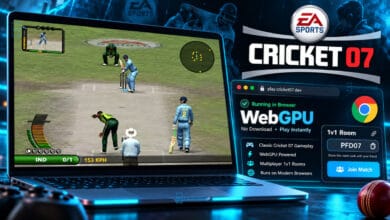
Software engineer Dhaiwat Pandya released a major update to his EA Sports Cricket 07 web port, enabling full mobile browser gameplay with virtual on-screen touch controls. Available directly at cricket07.dhaiwat.com, smartphone users across Android and iOS can now boot the iconic 2006 sports title inside mobile Chrome, Safari, or Brave without installing APK packages, emulators, or third-party mapping utilities.
Touch Latency and Cache Overhead on Mobile Devices
Playing a timing-intensive PC sports simulation through a smartphone touchscreen introduces noticeable operational trade-offs. Virtual on-screen buttons lack tactile feedback, making late cuts and aggressive lofted drives harder to time compared to physical keyboards or Bluetooth controllers. Furthermore, initial asset caching requires downloading between 438MB and 1.1GB into mobile browser storage, creating thermal throttling and battery drain on entry-level handsets.
Key Mobile Features Added to Cricket 07 Browser Port
- Native Virtual Touch Controls: An on-screen D-pad and dedicated action buttons handle directional footwork, lofted shots, defensive blocks, and running between the wickets.
- Fullscreen Landscape Locking: Mobile viewports automatically lock into 16:9 landscape orientation, disabling disruptive browser pull-to-refresh gestures.
- Cross-Device Multiplayer: Mobile players can host or join 1v1 online matches against desktop competitors over peer-to-peer WebRTC connections.
- WebAssembly and WebGPU Optimization: Recompiled x86 binaries execute client-side, sustaining 60 FPS rendering on modern smartphone chipsets.

Cricket 07 Mobile Browser Specifications and Architecture
Reviewing technical specifications highlights how the mobile browser port operates across portable operating systems:
| Platform / Metric | Technical Specification |
|---|---|
| Access URL | cricket07.dhaiwat.com directly in mobile browsers |
| Supported Operating Systems | Android 10+ (Chrome, Brave, Firefox) and iOS 16+ (Safari) |
| Control Scheme | On-screen touch virtual controller with optional Bluetooth gamepad input |
| Graphics & Runtime Engine | WebAssembly (Wasm) translation layer accelerated by WebGPU and WebGL |
| Initial Storage Footprint | Approximately 438MB for Lite assets up to 1.1GB for full commentary |
| Installation Requirement | Zero local installation; runs entirely inside browser IndexedDB memory |
| Multiplayer Protocol | Peer-to-peer 1v1 matchmaking utilizing WebRTC data channels |

Platform Comparison: Mobile Browser vs Desktop vs Classic PC
Benchmarking the mobile browser edition against desktop web and original PC releases highlights major generational shifts:
| Feature | Cricket 07 Mobile Browser | Cricket 07 Desktop Browser | Classic PC CD-ROM (2006) |
|---|---|---|---|
| Hardware Needed | Any modern smartphone | PC / Mac / Chromebook | Windows XP / 7 PC |
| Controls | Virtual touch or Bluetooth | Keyboard or USB gamepad | Keyboard or Gamepad |
| Initial Setup | Instant mobile browser link | Instant desktop browser link | Physical disc or ISO mounting |
| Multiplayer | 1v1 WebRTC online matches | 1v1 WebRTC online matches | Local 2-player or direct IP |
| Storage Required | Browser cache (~450MB–1GB) | Browser cache (~450MB–1GB) | 1.2GB–2GB hard disk install |
Running the simulation natively in mobile browsers democratizes access for millions of nostalgic cricket fans who no longer own vintage Windows PCs. While desktop browsers retain superior input precision through physical key switches, mobile accessibility allows spontaneous matches anywhere with an active internet connection.
How to Run Cricket 07 on Mobile Browsers Smoothly
Enjoying Cricket 07 on smartphones requires minor preparation to ensure stutter-free gameplay. Players should connect to Wi-Fi during the initial 438MB asset download, switch orientation to landscape, and pair a Bluetooth controller if touch buttons feel overly sensitive. Gamers curious about the original desktop deployment can revisit PaidFreeDroid’s coverage on the initial Cricket 07 browser port or explore browser-based GTA Vice City guides to discover more classic PC restorations.
Stay Ahead in the Tech World
Join our community for breaking news, exclusive gadgets coverage & direct admin support.